
Aadhaar Card Download Kaise Kare? (2026 Step-by-Step Guide)
भारत में Aadhaar Card एक बहुत ही ज़रूरी पहचान पत्र है। आज लगभग हर सरकारी और निजी काम में Aadhaar Card की आवश्यकता होती है। कई बार ऐसा होता है कि Aadhaar Card खो जाता है, खराब हो जाता है या तुरंत जरूरत पड़ जाती है। ऐसी स्थिति में आप Aadhaar Card online download कर सकते हैं।
इस लेख में हम आपको Aadhaar download kaise kare इसका पूरा प्रोसेस आसान भाषा में समझाएंगे। यह एक informational guide है, जिससे आप official portal पर सही तरीके से e-Aadhaar डाउनलोड करना सीख सकें।
⚠️ यह वेबसाइट केवल जानकारी देने के उद्देश्य से बनाई गई है। हम किसी भी सरकारी संस्था से जुड़े नहीं हैं।
Aadhaar Online Services 2026
Quick access to all essential Aadhaar services in one place
Download e-Aadhaar
Download your Aadhaar card in PDF format.
DOWNLOAD → 🛡️Generate Virtual ID
Create or retrieve your Virtual ID (VID).
GENERATE → 📊MyAadhaar Dashboard
Access all Aadhaar services in one place.
ACCESS → 🌐UIDAI Portal
Visit the official UIDAI website.
VISIT → ✏️Update Aadhaar
Update Aadhaar details online.
UPDATE → 🔍Check Status
Track Aadhaar enrolment or update.
CHECK → 🔑Retrieve Aadhaar / EID
Recover lost Aadhaar or EID.
RETRIEVE → 💳Order PVC Card
Order Aadhaar PVC card online.
ORDER → 🚚Track PVC Card
Track PVC Aadhaar card delivery.
TRACK →Aadhaar Card Kya Hota Hai?
Aadhaar Card भारत सरकार द्वारा जारी किया गया एक 12 अंकों का यूनिक पहचान नंबर होता है, जो किसी व्यक्ति की पहचान और पते को प्रमाणित करता है। Aadhaar Card का उपयोग कई सरकारी योजनाओं, बैंकिंग सेवाओं, मोबाइल सिम, पैन कार्ड, और अन्य सेवाओं में किया जाता है।
Aadhaar दो रूपों में उपलब्ध होता है:
Physical Aadhaar Card
e-Aadhaar (Digital Aadhaar)
e-Aadhaar Kya Hota Hai?
e-Aadhaar आपके Aadhaar Card का डिजिटल संस्करण होता है, जो PDF format में उपलब्ध रहता है। यह पूरी तरह से वैध (valid) होता है और इसे Aadhaar Card की तरह ही इस्तेमाल किया जा सकता है।
e-Aadhaar की खास बातें:
PDF format में होता है
Password protected रहता है
Physical Aadhaar जितना ही valid
Mobile या laptop में आसानी से save किया जा सकता है
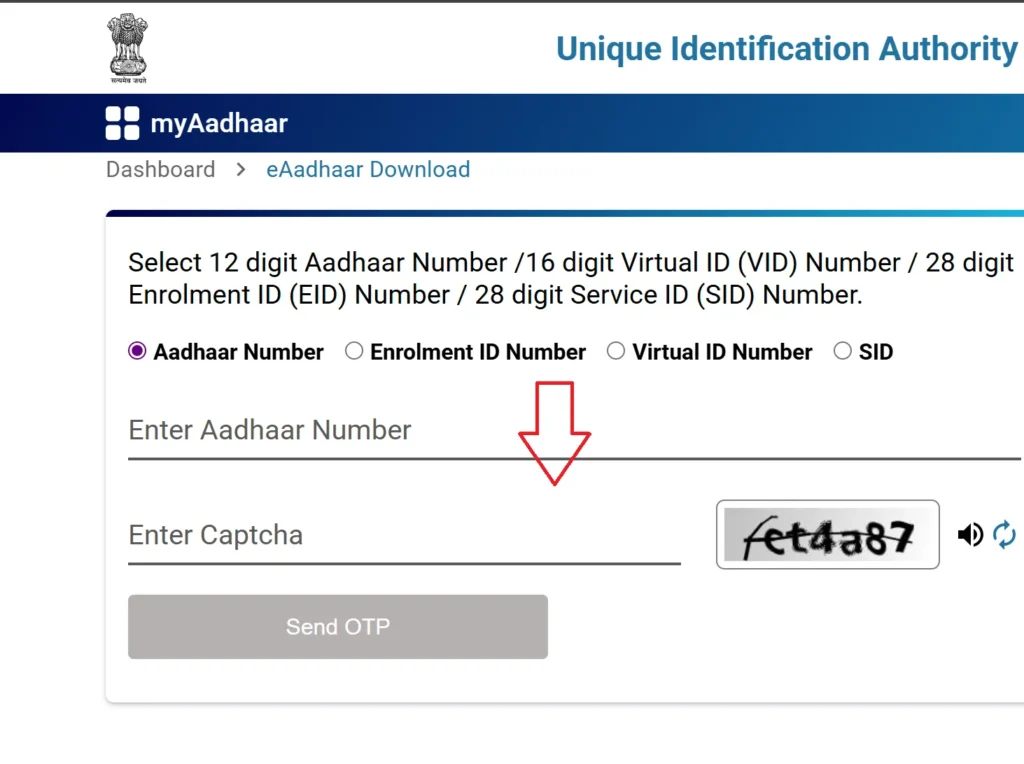
Enter the Required Aadhaar Details
Enter your Aadhaar Number, EID, or VID and verify the request by completing the captcha shown on the screen.
OTP-Based Aadhaar Authentication
A One-Time Password (OTP) will be sent to your registered mobile number. Enter the OTP to verify your identity and proceed to the next step securely.
Download the Secure e-Aadhaar PDF File
After successful verification, download your e-Aadhaar PDF securely. The file is password-protected—use the first four capital letters of your name followed by your year of birth to open it.
Note: To update your mobile number in Aadhaar, you must visit a nearby Aadhaar Enrolment Centre. Provide your Aadhaar number and the new mobile number, and complete biometric verification (fingerprint or iris scan). No supporting documents or old mobile number are required for this update. The process is completely free, and you will receive a confirmation message once the update is successfully processed.
Download Aadhaar (e-Aadhaar)
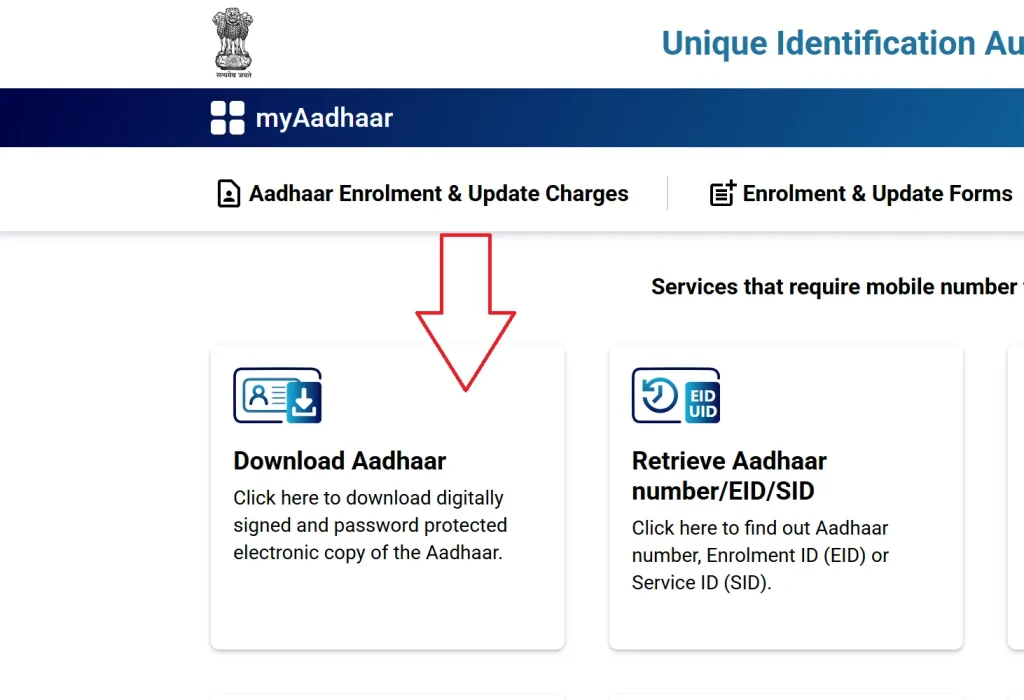
Follow these simple steps to download your e-Aadhaar for use across multiple online and offline services.
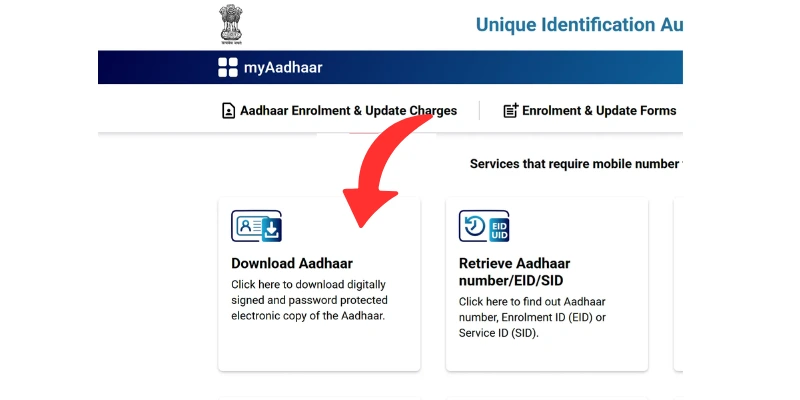
Visit the Aadhaar Download Page
Go to the official My Aadhaar UIDAI portal at myaadhaar.uidai.gov.in and click on the “Download Aadhaar” option to begin the process.
Aadhaar Card Download Karne Ke Tarike
Aadhaar Card को download करने के तीन मुख्य तरीके होते हैं:
1️⃣ Aadhaar Number se Aadhaar Download
2️⃣ VID (Virtual ID) se Aadhaar Download
3️⃣ EID (Enrolment ID) se Aadhaar Download
नीचे हम तीनों तरीकों को detail में समझा रहे हैं।
Aadhaar Number Se Aadhaar Card Download Kaise Kare?
अगर आपके पास अपना 12-digit Aadhaar number है और Aadhaar से mobile number जुड़ा हुआ है, तो आप आसानी से e-Aadhaar डाउनलोड कर सकते हैं।
Process:
Official Aadhaar portal पर जाएं
“Download Aadhaar” विकल्प चुनें
Aadhaar Number दर्ज करें
Captcha भरें
OTP verify करें
Aadhaar PDF download करें
यह सबसे आसान और ज़्यादा इस्तेमाल होने वाला तरीका है।
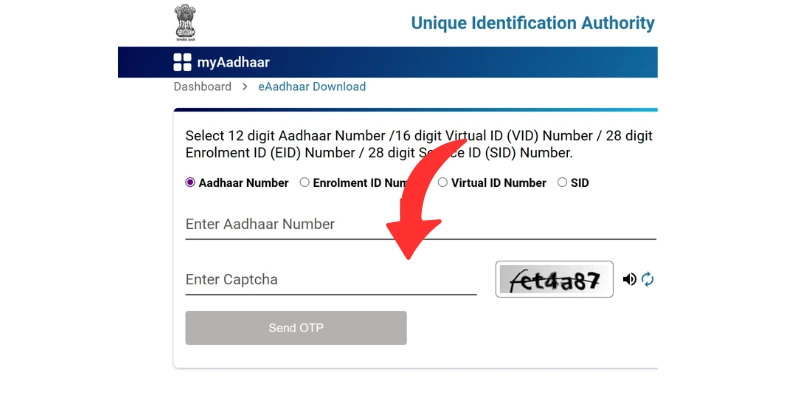
Enter Your Aadhaar Details
Provide any one of the following details to proceed:
Aadhaar Number
Enrolment ID (EID)
Virtual ID (VID)
After entering the required information, complete the security captcha displayed on the screen.
Authenticate Using OTP
An OTP (One-Time Password) will be sent to your registered mobile number. Enter the OTP to verify your identity securely and continue with the Aadhaar service.
Aadhaar PDF Password Kaise Open Kare?
e-Aadhaar PDF file password protected होती है।
Password Format:
First 4 letters (Capital) of Name + Year of Birth
Example:
Name: RAMESH
DOB Year: 1995
Password: RAME1995
⚠️ Password गलत डालने पर PDF open नहीं होगी।
बहुत से लोगों के लिए Aadhaar download करना जरूरी हो जाता है, जैसे:
Aadhaar Card खो गया हो
नया Aadhaar अभी डिलीवर न हुआ हो
Online form भरते समय Aadhaar की जरूरत हो
PVC Aadhaar से पहले e-Aadhaar चाहिए हो
Note: You can also check your Aadhaar enrolment or update status by calling the UIDAI toll-free number 1947 from your registered mobile number. After dialing, choose your preferred language (for example, press 1 for Hindi or 2 for English). Then, press 1 to check enrolment status or 2 to check update status. When prompted, enter your 28-digit Enrolment ID (EID) or Update Request Number (URN) and follow the voice instructions to hear your current status, such as “Aadhaar Generated” or “Under Processing.” This service works only if your mobile number is registered with UIDAI.
Verify Mobile Number or Email with Aadhaar
To access free Aadhaar online services, make sure your mobile number and email ID are linked with Aadhaar.
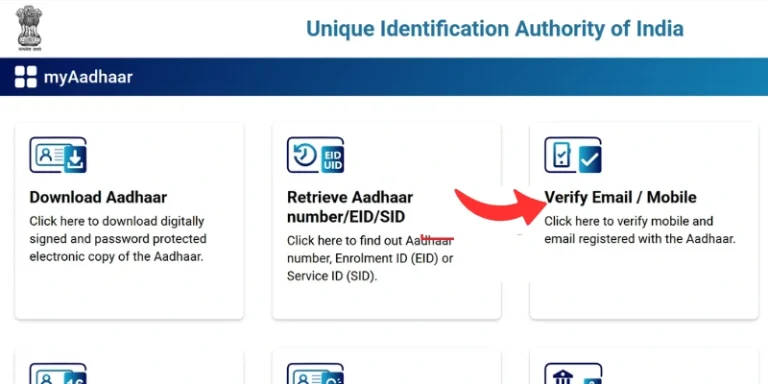
Step 1: Visit the Official Portal
Go to the My Aadhaar UIDAI portal at myaadhaar.uidai.gov.in and click on the “Verify Email/Mobile” option to continue.
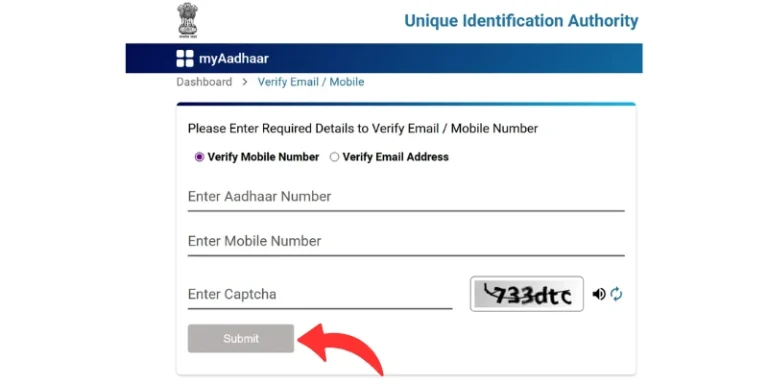
Step 2: Enter Aadhaar and Contact Details
Enter your Aadhaar number along with the mobile number or email ID you want to verify.
Step 3: Complete Security Verification
Fill in the captcha code displayed on the screen to proceed.
Step 4: Verify Using OTP
An OTP (One-Time Password) will be sent to the entered mobile number or email ID. Enter the OTP to complete the verification process securely.
Enter the OTP (One-Time Password) to complete the verification process. If the details match UIDAI records, a confirmation message will be displayed successfully.
Important: Ensure that your mobile number is registered with UIDAI to receive the OTP and complete the Aadhaar verification process successfully.
Get Your Aadhaar Number or Enrolment ID (EID)
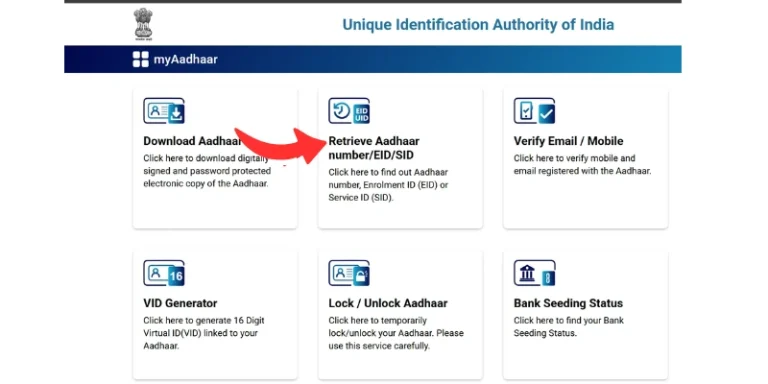
Step 1: Visit the Official Portal
Go to the My Aadhaar UIDAI portal at myaadhaar.uidai.gov.in and click on the “Retrieve EID / Aadhaar Number” option to proceed.
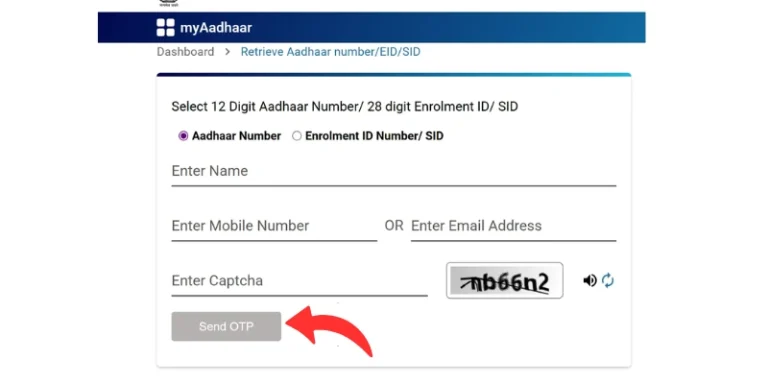
Step 2: Enter Your Personal Details
Provide your full name along with your registered mobile number or email ID. Then, select whether you want to retrieve your Aadhaar Number or Enrolment ID (EID).
Step 3: Verify Your Identity
Complete the captcha verification, request an OTP, and enter the OTP received on your registered mobile number or email ID to confirm your identity securely.
Step 4: Receive Your Aadhaar Number or EID
After successful verification, your Aadhaar Number or Enrolment ID (EID) will be sent directly to your registered mobile number or email ID.
VID (Virtual ID) Se Aadhaar Download Kaise Kare?
VID (Virtual ID) एक 16-digit temporary number होता है, जिसे Aadhaar number की जगह इस्तेमाल किया जा सकता है।
VID से download करने के फायदे:
Aadhaar number share नहीं करना पड़ता
Privacy सुरक्षित रहती है
Process:
Download Aadhaar section खोलें
VID option चुनें
16-digit VID डालें
OTP verify करें
Aadhaar PDF डाउनलोड करें
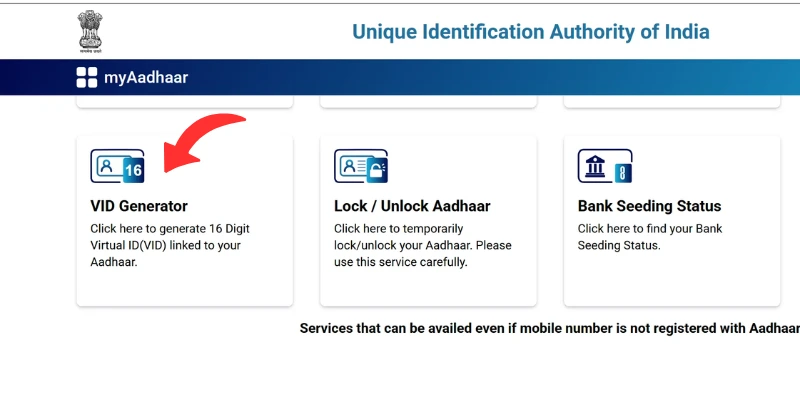
Step 1: Visit the Official Portal
Go to the My Aadhaar UIDAI portal at myaadhaar.uidai.gov.in and select the “VID Generator” option to begin.
Step 2: Enter Aadhaar Details
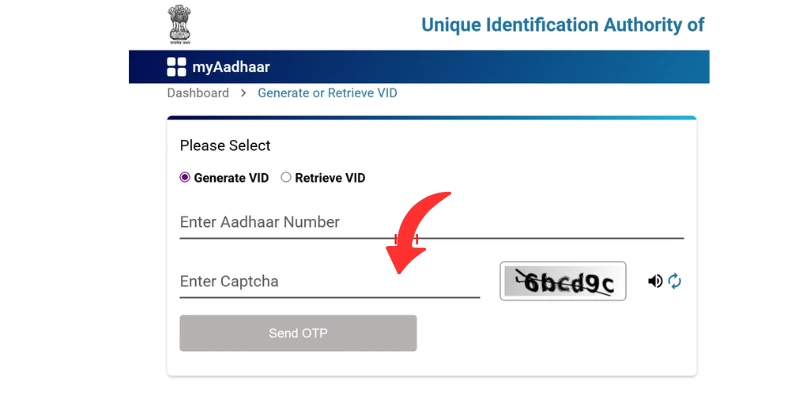
Enter your Aadhaar Number and verify your identity using the OTP sent to your registered mobile number.
Step 3: Choose VID Option
Select “Generate New VID” to create a new Virtual ID, or choose “Retrieve Existing VID” if you want to recover a previously generated VID.
EID (Enrolment ID) Se Aadhaar Download Kaise Kare?
अगर आपने हाल ही में Aadhaar के लिए आवेदन किया है और Aadhaar number अभी नहीं मिला है, तो आप EID (Enrolment ID) से Aadhaar डाउनलोड कर सकते हैं।
EID kya hoti hai?
Aadhaar enrolment slip पर लिखी होती है
Date & time के साथ एक लंबा नंबर होता है
Process:
Download Aadhaar page खोलें
EID option चुनें
Enrolment ID डालें
OTP verify करें
e-Aadhaar डाउनलोड करें
Masked Aadhaar Kya Hota Hai?
Masked Aadhaar में आपके Aadhaar number के पहले 8 अंक छिपे होते हैं और केवल आखिरी 4 अंक दिखाई देते हैं।
Masked Aadhaar ke fayde:
Privacy सुरक्षित रहती है
Aadhaar misuse का खतरा कम
कई जगह accepted होता है
Visit the official My Aadhaar UIDAI portal at myaadhaar.uidai.gov.in.
Click on the “Locate Enrolment Center” option.
Search by entering your PIN code, city, or state.
View the list of nearby Aadhaar Seva Kendras along with their addresses and contact details.
Aadhaar Download Karte Samay Aane Wali Common Problems
❌ OTP Nahi Aa Raha
Network issue
DND activated
Mobile number Aadhaar se link nahi
❌ Aadhaar Download Fail Ho Raha
Wrong details
Server busy
Captcha error
❌ Mobile Number Link Nahi Hai
OTP receive nahi hoga
Offline update karna padega
Aadhaar Download Kitni Baar Kar Sakte Hain?
आप Aadhaar Card कितनी भी बार download कर सकते हैं।
Is par koi limit nahi hoti.
Kya e-Aadhaar Valid Hota Hai?
✔️ Yes, e-Aadhaar पूरी तरह से valid होता है।
Iska use aap:
Bank
Government schemes
Identity proof
के रूप में कर सकते हैं।
Aadhaar Card Free Me Download Hota Hai?
✔️ हां, Aadhaar download bilkul free hota hai।
Iske liye koi fees nahi lagti।
| Feature | e-Aadhaar | PVC Aadhaar |
|---|---|---|
| Format | Plastic Card | |
| Cost | Free | Paid |
| Delivery | Instant | Courier |
| Validity | Valid | Valid |
Aadhaar Download Related FAQs
Q1. Bina mobile number Aadhaar download ho sakta hai?
नहीं, OTP verification के बिना Aadhaar download संभव नहीं है।
Q2. Aadhaar download karne me kitna time lagta hai?
OTP verify hote hi turant download ho jata hai।
Q3. Aadhaar PDF open nahi ho rahi, kya kare?
Password format check karein।
Q4. Aadhaar download ke liye age limit hai?
Nahi, koi age limit nahi hai।
Q5. Aadhaar ka duplicate copy kaise milegi?
e-Aadhaar download karke duplicate copy mil sakti hai।
Important Disclaimer
Disclaimer:
This website is an independent informational platform.
We are not affiliated with UIDAI or any government authority.
Aadhaar related official services ke liye hamesha uidai.gov.in ka use karein.
Final Words
Aadhaar Card download करना आज के समय में बहुत आसान है, बस सही जानकारी होना जरूरी है। इस guide में हमने आपको Aadhaar download kaise kare इसका पूरा process step-by-step समझाया है।
अगर आप इस तरह की और Aadhaar से जुड़ी जानकारी चाहते हैं, तो हमारी website पर बने रहें।